
Post content has been hidden

To unblock this content, please click here

Happygoldconfetti7588
Beginner July 2022 Cumbria

Menu plan

Happygoldconfetti7588, 13 June, 2022 at 21:52 Posted on Feedback to Hitched 0 4
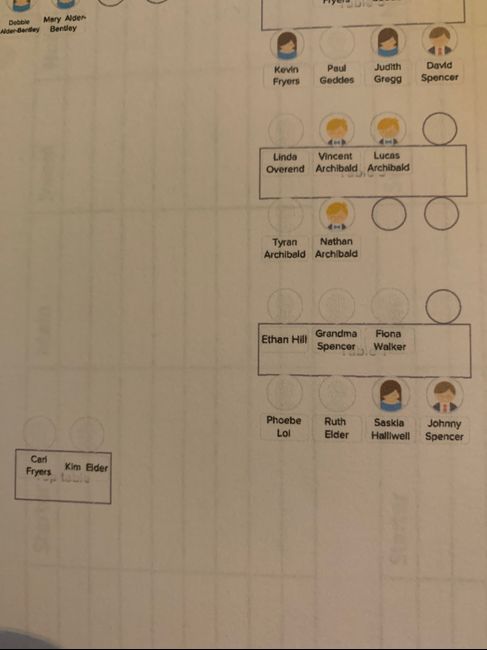
We’ve been doing our seating plan on the hitches website and have just printed it out, on the pdf some guests have a little girl or boy picture but some are blank, I can’t find anywhere where I would add whether a guest is male or female, I obviously must’ve done this at some point though, but I can’t find it now. Where would I add this info please so that every guest has a little picture by their name Smiley smile
Thank you Menu plan 1


4 replies

Latest activity by Boult, 29 December, 2025 at 12:30
  • C
    VIP April 2022 Wiltshire
    Charlotte ·
    • Report
    • Hide content

    This is because Hitched changed the ability to assign a gender some months ago. When you create a guest you used to be able to select male or female which then put the picture in. If you didn't select it then it is blank, but you now cannot go back in and choose it so you will unfortunately have a mixture, which is annoying. I challenged them and they said it was to be more inclusive which i get, but the way they removed gender totally is achieving the opposite, they should have added a box for Non Gender Specified!

    • Reply
  • Happygoldconfetti7588
    Beginner July 2022 Cumbria
    Happygoldconfetti7588 ·
    • Report
    • Hide content
    View quoted message
    That’s really unhelpful of hitched!!
    There’s not even an option of taking the pictures off 🫤 it’s like they did a half a job lol
    • Reply
  • Boult
    Curious July 2020 Maryland
    Boult ·
    • Report
    • Hide content

    It looks like some guests are missing the little boy/girl icons because their gender wasn’t set. On the Hitched website, you can update this by editing each guest’s details in the guest list section just open their profile and add the gender information. After updating, simply download the PDF again and the icons should appear correctly.

    • Reply
  • Boult
    Curious July 2020 Maryland
    Boult ·
    • Report
    • Hide content

    It sounds like the seating plan export isn’t showing all details consistently. You might need to update the guest information on the website first. Once everything is correct, you can gabung PDF files to create a single, complete seating plan with all icons visible for each guest.

    • Reply

You voted for . Add a comment 👇

×

Related articles

General groups

Hitched article topics