Post content has been hidden

To unblock this content, please click here

S
Beginner July 2023 West Sussex

Text boxes - page design

Stephanie, 24 October, 2022 at 14:16 Posted on Feedback to Hitched 0 4

Hi,

please help.


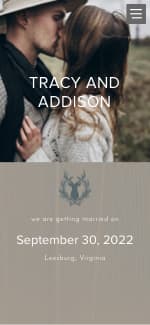
I find myself frustrated because you can't seem to add in your own text box? I would like a page all about the day itself with the venue address and other information on one page but apparently you can either have 1 text box on a page or multiple addresses... WHY can't you have both?! Does anyone know if this is a possibility?


Thanks
4 replies

Latest activity by Seattlesky, 13 October, 2026 at 07:28
  • Lea
    Rockstar July 2023 Kent
    Lea ·
    • Report
    • Hide content

    Hi Stephanie,

    I created pages using the 'wedding blog' page and changed the titles. I didn't use the address page. I added links to hotels etc. Not ideal but the best I could do with the tool.

    Our website

    • Reply
  • M
    Dedicated September 2025 Kent
    Melanie ·
    • Report
    • Hide content

    Hi Stephanie,

    The best option annoyingly is the blog tab. Have a look at my website, I've been playing around with it for the past couple of days - hopefully this will give you some inspo!

    Welcome! - Melanie & James (hitched.co.uk) If it asks for a password - Sept2025

    xx

    • Reply
  • Tobic
    Lothian & Borders
    Tobic ·
    • Report
    • Hide content

    It sounds like you're hitting a wall with the template's layout restrictions, which is beyond annoying when you're just trying to get all your details in one spot. I’ve run into similar formatting headaches before, especially when trying to manage specific font scripts for wedding invites. Usually, I end up having to use a krutidev to unicode converter just to get the text to play nice with different design editors that don't support standard Hindi typing. If the platform won't let you add a second box, you might have to design that specific page in a separate program and upload it as a full-page image instead.

    • Reply
  • S
    Beginner March 1991 West Yorkshire
    Seattlesky ·
    • Report
    • Hide content

    Text boxes are a great way to organize content and make a page design look clean and easy to read. Choosing the right font size and spacing can also make a big difference in the overall layout. A small text generator can be useful when you want to add a different text style to headings, labels, or other small design elements.

    • Reply

You voted for . Add a comment 👇

×

Related articles

General groups

Hitched article topics